SMTP Evidence | Mail Server Roles | Expert Witness Knowledge

Expert SMTP Evidence | Examination of Email Evidence as a Witness

As an expert witness for email digital evidence examination, the SMTP mail server roles are an important area of focus. This blog post describes the different SMTP mail server roles and how they relate to expert witness testimony for any court case where SMTP evidence is present.

Any information system used for email purposes can have different sub-functions (roles) within it, depending on its exact role within a particular information system.  Internet standard RFC 5598 provides a clear definition of these mail server roles.

Email Evidence: Mail Server Role Definitions

https://www.rfc-editor.org/rfc/rfc5598.pdf

  • ADMD: ADministrative Management Domains -> This independence of administrative decision-making defines boundaries that distinguish different portions of the Internet Mail service.
  • MUA: Mail User Agent -> The client software any individual uses to send email.
  • MSA: Mail Submission Agent -> The Mail Server software that receives a message after the user sends it in the MUA. The sending user’s MUA connects directly to the MSA and submits the message into the SMTP process.
  • MTA: Mail Transfer Agent -> The Mail Server software that passes the message along to other servers (MTAs) in the series of hops between sender and receiver. Multiple MTAs are involved in the transfer of an email message. An MTA is both an SMTP client and server.
  • MX: Mail Exchanger -> The system identified as a responsible receiver for mail sent to a given hostname or domain. The receiver system is designated in a DNS record with the “MX” record type. Each destination host or domain can have multiple MXes for redundancy and load balancing purposes. The MX serves as a last step using SMTP connection.
  • MHS: The purpose of the Message Handling System (MHS) is to exchange an email message object among participants
  • MDA: Mail Delivery Agent -> The Mail Server software that provides mail messages to a user after successful authentication.

Email Evidence: Mail Server Roles Conceptual Example

A conceptual diagram representing the mail server roles and relationships is shown below.
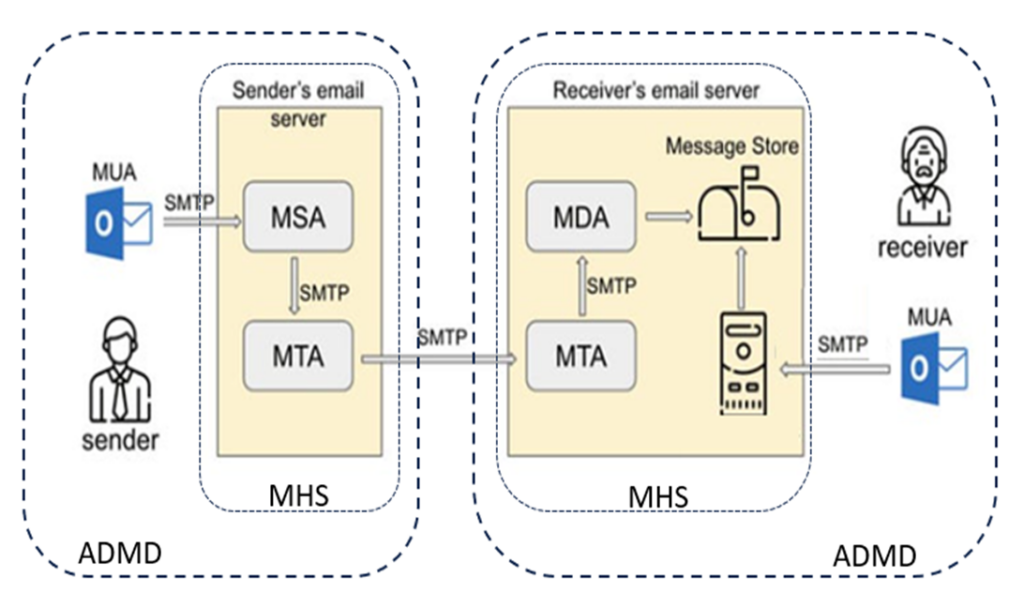
Email delivery pathway for an email forensic consulting project.
Mail Server Roles

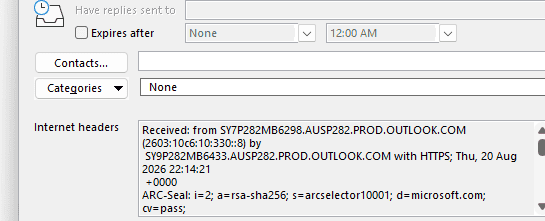
The delivery steps between the various stages described here are immutably logged in the message header of any SMTP message as clear event types.  This information allows a clear picture of all the various stages involved in the email delivery. SMTP evidence can be present in any court case involving the mail server roles.

Sub-roles (apart from MUA) are all roles that can be performed by a Mail Server. A Mail Server will reside in a particular information system, and merely describe the sub-role it may be performing within any information system. 

Any mail server will provide security to the email transport layer. See emailsecurityexpert.com to hire an email security expert.

Email Information System Definitions

An email information system is defined as an ADMD in terms of the RFC5598.

These are common examples of ADMDs:

  • Enterprise Service Providers: These ADMDs operate the internal data and/or the mail services within an organization.
  • Internet Service Providers (ISP): These ADMDs operate the underlying data communication services. ADMDS used by one or more Relay and User. ISPs are not responsible for performing email functions, however they can provide an environment in which those functions can be performed.
  • Mail Service Providers: These ADMDs operate email services, such as for consumers or client companies.

One example of an “Enterprise Service Provider” ADMD is an information system operated by a company or business.

It is the MTA role that is relevant when examining email delivery questions.

Email Information System Migration Expert

A business may decide to move from an old to a new email information system. With an email migration from Exchange to Office 365 we recommend Office365migrate.com for email migration expert consultants.

Summary | SMTP Mail Server Roles

A Mail Server can perform multiple roles in the context of email delivery SMTP evidence, and it is important that any expert email witness understands each mail server role.

Any email forensics expert should be able to credibly explain the mail server roles and how the relate to the defined RFC standard for mail server delivery. This explanation, along with a clear understanding of the qualifications and work history of an email expert witness, will help in any court case.

Contact us today for help in your email litigation action where you need an email messaging expert to support your litigation.

If you are reading this article and need help with your email migration project to Office 365, then please contact the team at office365migrate.com
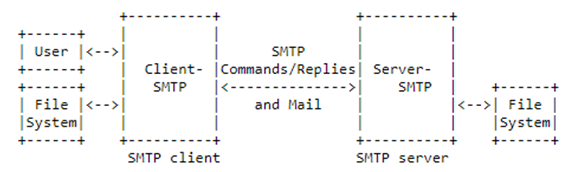
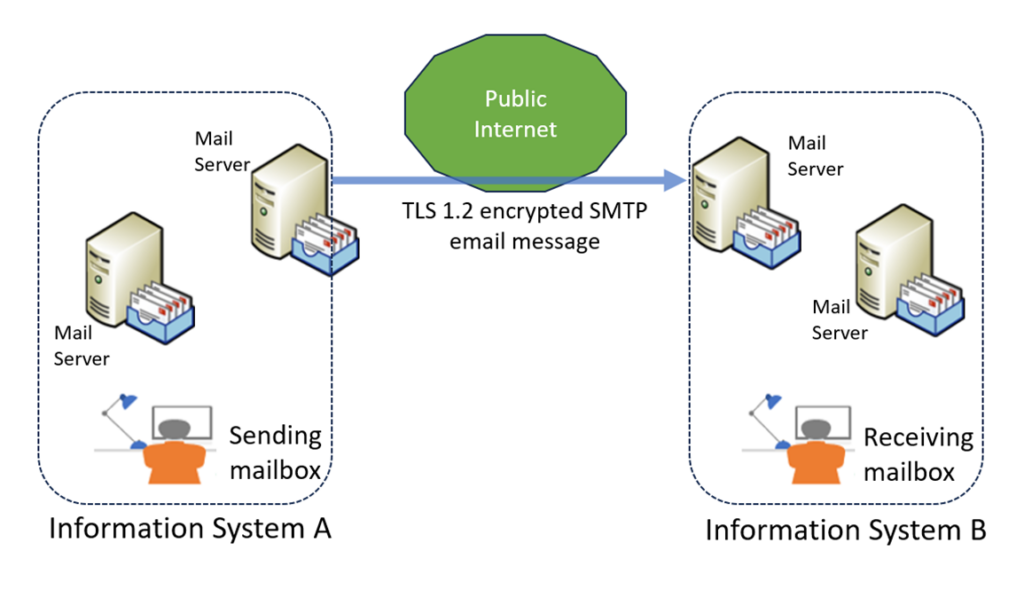
Table of Contents

    Email Forensic Investigation | Email Delivery Log Retention

    Email Forensic Investigation Evidence: Log Retention used by a Witness

    For any successful email forensic investigation, the availability of email logs is a key requirement. Email messages are sent using the Simple Mail Transfer Protocol (SMTP), defined here. This blog post describes the importance of retaining the SMTP delivery logs so they can be used as part of any email forensic investigation.

    Email SMTP forensics can use the RFC standards for SMTP to help establish provenance.
    SMTP Protocol for Email Delivery

    As an email is sent and delivered to the recipient, the email will pass through multiple mail gateways. These gateways are also known as Message Transfer Agents (MTAs). An MTA will belong to an email system, and will be a key area of focus during the forensic investigation of an email.

    Any credible expert acting as a witness in a court case should have the attributes in this blog post.

    Email Message Transport Log Files

    The MTA’s belonging to your email system will usually have email log files available for examination. These log files may only be stored for a limited period of time, for example 90 days. Effort is required to ensure email message logs within your email system are retained for a much longer period, for example 7 years. This can be achieved in different ways, such as a scheduled task that copies them to a secure location. Or via an email server backup job. A thorough email forensic investigation can be undertaken with all available SMTP protocol log files.

    Retaining the email message transport log files is crucial to the success of any email forensic investigation. This provides immutable evidence of the path an email message takes between email systems. The SMTP protocol ensures the email message header is stamped with meta-data as it moves between the sender’s mailbox, and the recipient’s mailbox. This SMTP header data cannot be removed, it can only be added to.

    Email Evidence: Terms and Definitions

    The term “email” is an acronym for “electronic mail”.  Both terms may be used within this report, especially during an investigation.

    The term email is listed in the Oxford English Dictionary as both a noun and a verb. This is important for understanding email forensic investigation terminology.

    https://www.oed.com/search/dictionary/?scope=Entries&q=email

    Email (noun): A system for sending textual messages (with or without attached files) to one or more recipients via a computer network (esp. the internet); a message or messages sent using this system. Also: an email address.

    Email (verb): transitive. To send (a message or file) by email; to send an email to (a person, organization, etc.). Many forensic investigators focus on these email details.

    Email Forensic Investigation | Delivery Example Used by a Witness

    This diagram shows a conceptual diagram of a typical email delivery from one email system to another. Email delivery is a key aspect of any Office 365 email migration project – see office365migrate.com to hire an email migration expert.

    Email forensic delivery between email systems. Email expert witness for email transport.

    The email passes through Mail Servers at each end, and is encrypted when going across the internet. This disallows any manipulation of the email. If the email logs are available from both the sender’s email system and the receiver’s email system, then a complete picture can be presented of the email delivery. This proves it was sent and received as part of the email, and is a valid conclusion of an email forensic investigation.

    There are a series of Mail Servers that belong to any sending email information system. The sent email message will traverse through this prior to routing over the public internet to the receiving information system belonging to the recipient.  

    Multiple Mail Servers | Mail Delivery

    Multiple Mail Servers may also be present within a receiving information system.  All Mail Servers may require reviewing as part of an email forensic investigation. Logs from these servers are crucial for a successful email forensic investigation.

    Summary: Importance of Log Retention for Email Evidence in Court

    Contact Rob Walton for a confidential discussion if you need expert email forensic consulting, or SMTP expert witness services.

    Table of Contents

      Recovery of Deleted Emails | Expert Email Evidence

      Deleted Item Retention: Forensic Email Evidence in Court

      Expert witness work for digital email forensics is often concerned with the recovery of deleted emails. A person may send an email, and then delete the email from their Sent Items, and also from their Deleted Items. And then claim they never sent the email. Being able to forensically prove email delivery can be key expert evidence in a court case – see court case examples here.

      Deleted email evidence required for litigation?

      Rob Walton provides independent email forensic analysis and expert witness services for cases involving deleted, disputed or allegedly altered email evidence.

      Undelete a Sent Email | Digital Evidence

      It is possible to investigate this further to prove that the email was sent by that person. Many email systems store an email that has been deleted, allowing for the recovery of deleted emails. In Google GSuite, for example, deleted emails are kept in the Archive for a long time, or until the Archive is full. A typical user may not be aware of this.

      Microsoft Office Exchange Online also has a “soft delete” and “hard delete” option for emails – similar to Google GSuite. Depending on the M365 license being used, there may be access to additional logging information within the Compliance Audit logs.

      Recover a Deleted Email from a Journal

      Larger email systems may have a Journal feature whereby copies of every email sent or received are placed into a separate Journal storage area. Examples of a Journal system might be in the Barracuda or MIMECast boundary email systems. Recovery of deleted emails from a Journal is often crucial.

      Journal SMTP for email forensic email compliance retention.

      A user may claim that someone else sent the email from their account. This can be investigated further in conjunction with user sign-in logs, and audit logs. It is often possible to demonstrate the device name and IP address used when the user was sending the email – which could be matched to the commonly used device name and IP address.

      Gather Expert Email Evidence Artefacts

      By gathering evidence, there comes a point where the weight of that evidence passes the “beyond reasonable doubt” test.

      Summary | Importance of Recovering Deleted Email Sent Items

      A person may try and prevent a sent email from being seen by deleting it. However, there are various ways that allow for recovery of deleted emails. This can be used as evidence in a court case where an email expert witness is demonstrating that an email was sent by a person.

      Contact us today if you want to discuss how we can help with your email forensics litigation matter to recover deleted emails.

      If you help to migrate your email system to Microsoft Office 365 then we recommend using the team at office365migrate.com

      Table of Contents

        Email Delivery Proof as SMTP Evidence

        Review SMTP Message Header as for Email Delivery Proof

        Email delivery proof can be found by examining the SMTP headers. The SMTP protocol has been around for a long time, and provides the ability for an email fraud expert to trace the delivery path taken from the sender to the recipient.

        This can be within the same email system, or between email systems. Understanding the SMTP headers can provide email delivery evidence necessary in many investigations. For instance, these headers are crucial in any analysis related to establishing provenance of email delivery.

        Email Delivery Provenance Markers

        There are additional markers that can be combined to provide additional evidence of a successful email delivery. These markers can all help in any email expert witness help needed for any legal action.

        Email headers can help establish the provenance level of email evidence.  Useful for an expert forensic examination.

        These markers form the basis for proof of email delivery in court.

        Example SMTP Delivery Markers

        Examples of markers may be read receipt, transport headers, delivery receipt, and message logs. Sometimes there is access to limited email delivery information. Expert analysis is then needed to provide an immutable picture of the email delivery path. These examples serve as email delivery proof in various scenarios, particularly when seeking comprehensive email delivery evidence.

        See the blog post on the Mail Server roles for more details on the SMTP delivery path as digital evidence. Such detailed knowledge can aid in proving email delivery and establishing strong email delivery proof.

        Conclusion: SMTP Message Header Evidence

        Please get in touch if you need an expert to help you with your email forensics case.

        If you need help migrating your email to Office 365 then we recommend contacting office365migrate.com. For an email security expert to review your email system security, we recommend using emailsecurityexperts.com.

        Table of Contents